
The Best Accounting Practice Management Software in Canada (2026 Guide)
Somewhere in your firm right now, a client document is sitting in an email thread. A CRA deadline lives on a spreadsheet that two people update but nobody fully trusts. An invoice is in one tool, a time entry in another, and a staff member is about to ask a question the whole team could answer instantly if everyone saw the same picture.
This is normal for most Canadian accounting practices. It also compounds fast as you take on more clients. Practice management software exists to solve exactly this problem: it brings your client records, deadlines, documents, communication, and billing into one system.
This guide covers what practice management software actually does, why Canadian firms have requirements that generic platforms miss, which platforms firms are evaluating in 2026, and a practical checklist you can take into any demo. Untangly, a platform built for Canadian tax and accounting firms, appears in the comparison, and we've kept the evaluation criteria fair enough that you can apply them to any vendor, including us.
Quick comparison: the platforms Canadian firms are evaluating in 2026
If you only have two minutes, this table covers the essentials. The rest of the article explains how to weigh each row for your firm.
| Feature | Untangly | Karbon | TaxDome | Canopy | CCH iFirm |
|---|---|---|---|---|---|
| Built for | Canadian tax, accounting, CPA, and audit firms | Growing teams focused on workflow and email collaboration | Tax-focused firms wanting an all-in-one suite | Firms that want modular features, strong in US tax resolution | Larger, compliance-heavy CPA firms |
| Pricing model | Flat base: $149/month covers your first 5 seats, then $49/seat, billed annually | $59 to $89 per user/month, billed annually. Business tier has a 3-user minimum | Roughly $700 to $1,200 per seat/year, billed upfront, tiered by plan and commitment length | $74 to $149 per user/month billed annually, plus paid add-ons | Modular, priced per module |
| Client accounts | Free and unlimited | Contact limits on lower tiers | Included | Included | Included |
| eSignature | Included | Paid add-on credits | Included | Included | Varies by module |
| White-label client portal | Included | Client portal included | Included, deeper branding on higher tiers | Included | Included |
| Time tracking and billing | Native | Native | Native | Modular add-on | Modular add-on |
| Migration and onboarding | Included, no setup fee | Varies by plan | Setup assistance available | Varies by plan | Implementation typically quoted |
| Contract | Annual, cancel online, no multi-year commitment | Monthly or annual | Annual or multi-year, paid upfront | Annual | Annual |
Competitor pricing reflects published rates as of August 2026 and can change; confirm current pricing directly with each vendor.
The CRA filing calendar at a glance
The deadlines a Canadian practice management platform should track natively
Deadlines shown are general CRA rules; individual client circumstances can vary.
What practice management software actually does
More than a task list
Practice management software is not a project management tool with accounting labels bolted on. A purpose-built platform connects client records, open engagements, filing deadlines, documents, team assignments, and billing into a single view. Instead of checking three tools to understand where one client stands, you see everything in one place, across your entire portfolio.
The workflows it replaces
Picture a typical tax season without dedicated software. You email a client to request their T4s. You email again when they don't respond. You email a third time when a document arrives with something missing. Deadlines sit in a shared calendar that everyone can edit but nobody owns. Signatures get printed, signed, scanned, and emailed back.
A capable platform replaces each of these with structured workflows: document request checklists, automated client reminders, built-in eSignature, and deadline tracking that updates as work moves forward.
Where your firm's time actually goes
Every disconnected tool adds a manual handoff. Handoffs are where things fall through the cracks.
Every line is a manual handoff someone has to remember
- Clients, engagements, and CRA deadlines
- Document requests and client portal
- Built-in eSignature
- Client chat and email in one thread
- Time tracking rolled into invoicing
- Team assignments and status views
- Automated client reminders
The whole team sees the same status, in real time
untangly.ai
Why consolidation matters beyond convenience
Every disconnected tool introduces a handoff, and handoffs are where things fall through the cracks. For a firm that bills by the hour, administrative friction has a direct cost: it eats capacity that could be billable. The case for consolidation isn't tidiness. It's recovering hours your team currently spends moving information between systems.
Why Canadian firms need more than a generic platform
CRA deadlines run on their own calendar
Canadian firm workflows are organized around CRA's filing schedule, and that schedule doesn't map cleanly onto what U.S.-built platforms track by default.
- T1 personal returns are due April 30 for most individuals, with a June 15 deadline for self-employed clients (any balance owing is still due April 30).
- T2 corporate returns are due six months after fiscal year-end, which varies client by client.
- GST/HST returns follow monthly, quarterly, or annual cycles with their own due dates.
A platform that treats these as custom fields you configure yourself costs your team setup time before it saves any.
PIPEDA and data obligations
Canadian firms collect sensitive financial and personal information that falls under PIPEDA. Under the law, your firm remains accountable for client data even when a cloud vendor holds or processes it. That means you need to know where the data lives, what security controls protect it, and how the vendor would support you in a breach scenario. PIPEDA requires notifying the Office of the Privacy Commissioner and affected individuals when a breach creates a real risk of significant harm, and firms must keep records of every breach for 24 months.
These are firm-level obligations, not vendor-level ones. Your platform choice is a compliance decision, not just a productivity one.
The reality of Canadian firm sizes
Most Canadian practices are small to mid-size: sole practitioners, firms with three to ten staff, and established practices up to about 50 people. Enterprise platforms built for large U.S. firms, sold with long implementation timelines, often don't fit the economics or the capacity of this market. Fit for your firm size matters as much as the feature list.
The features that actually matter
Deadline and engagement tracking built for Canadian filing cycles
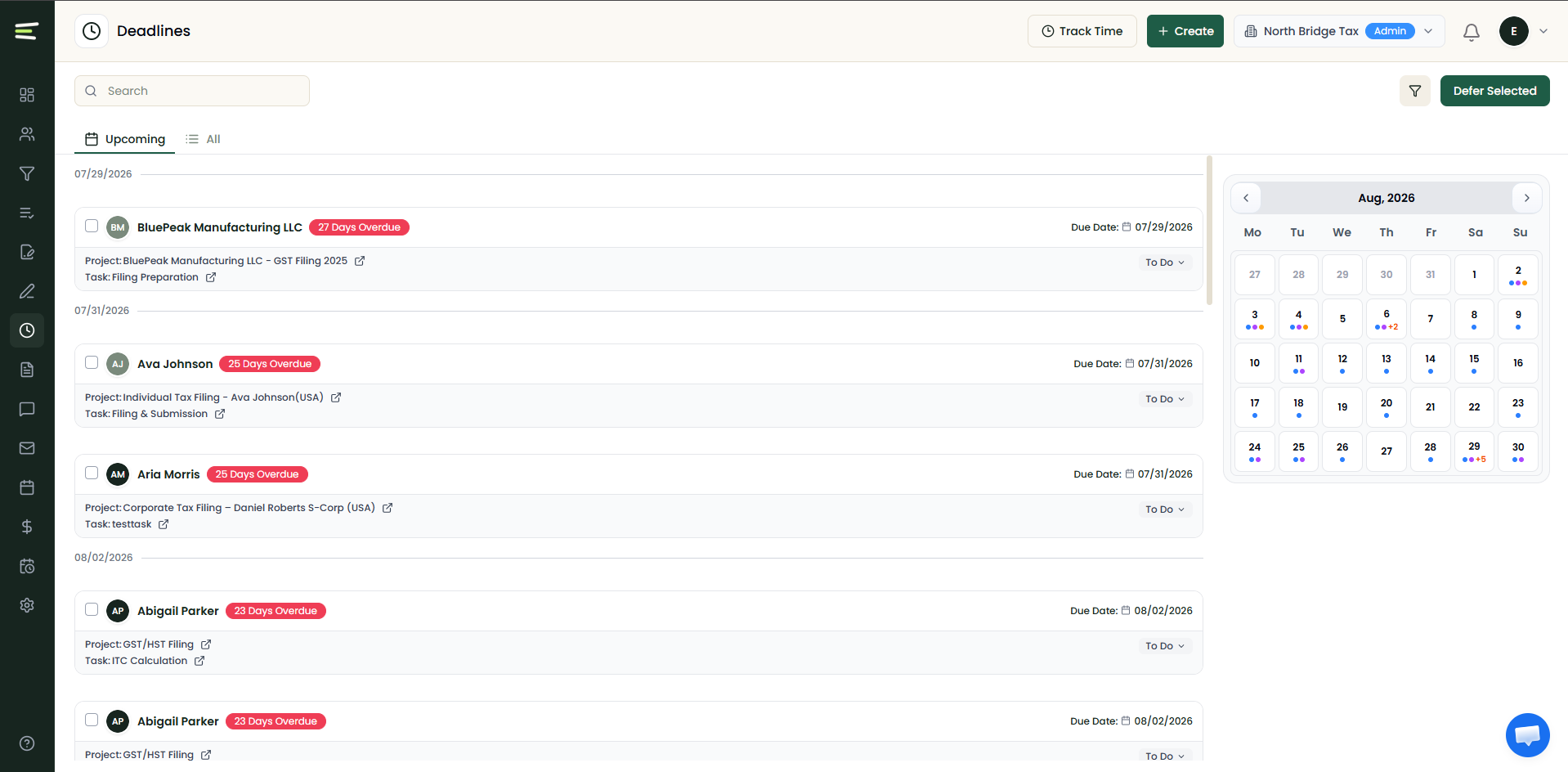
Look for a platform that lets you map engagements to filing types (T1, T2, GST/HST) and set deadline rules that follow CRA's actual calendar rather than a generic due-date field. Every team member should be able to see every open engagement, its status, and whether anything is at risk, without opening multiple tabs or asking a manager.
Document collection, eSignature, and the client portal
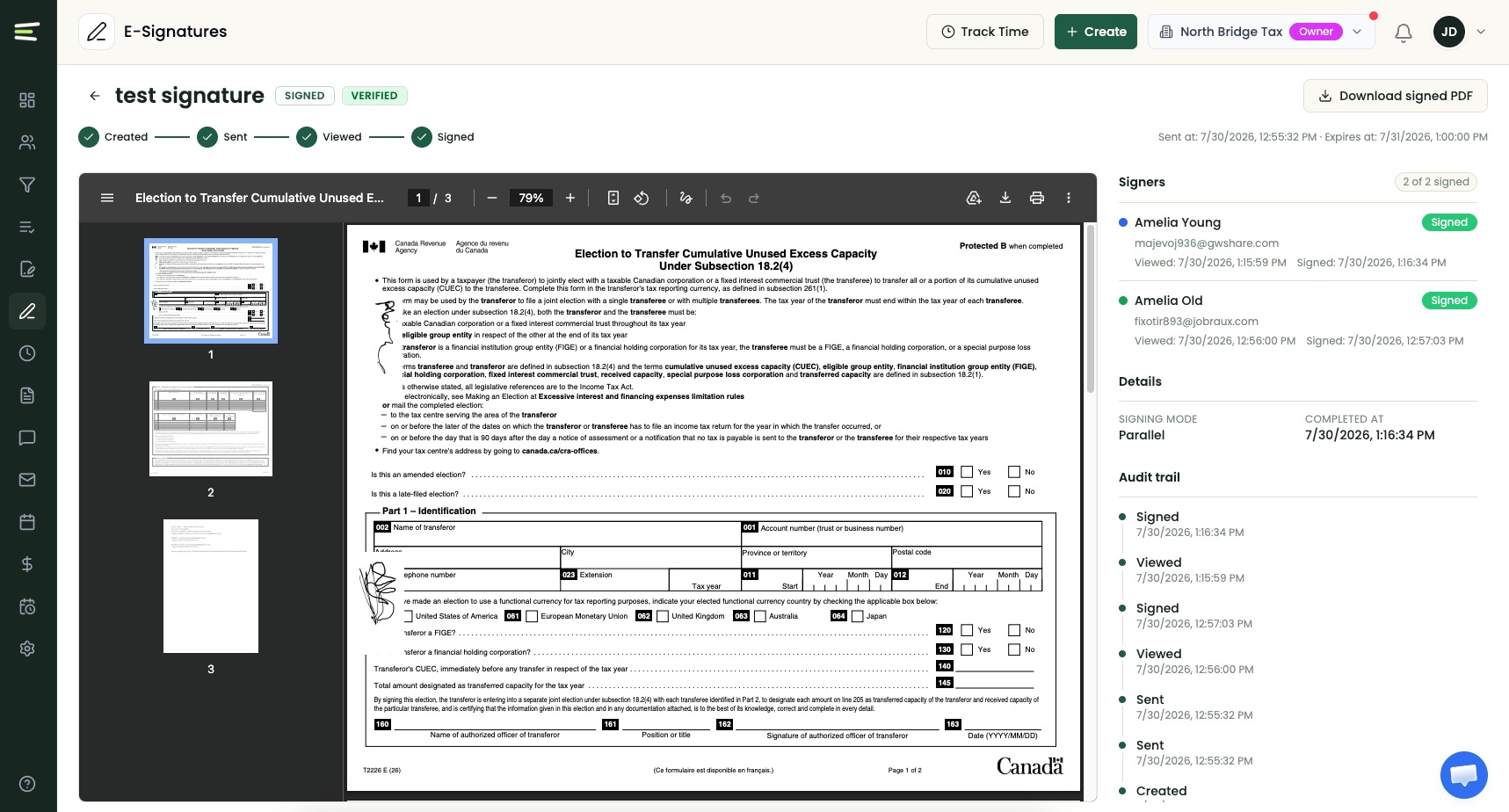
Collecting documents from clients is one of the most time-consuming parts of tax season. A strong platform gives you structured request checklists, a secure portal where clients upload directly, and eSignature that meets Canadian electronic signature requirements, all working together in one workflow. If you need a separate eSignature subscription, a separate portal login, and a separate storage tool, you haven't consolidated anything.
Billing, time tracking, and integrations
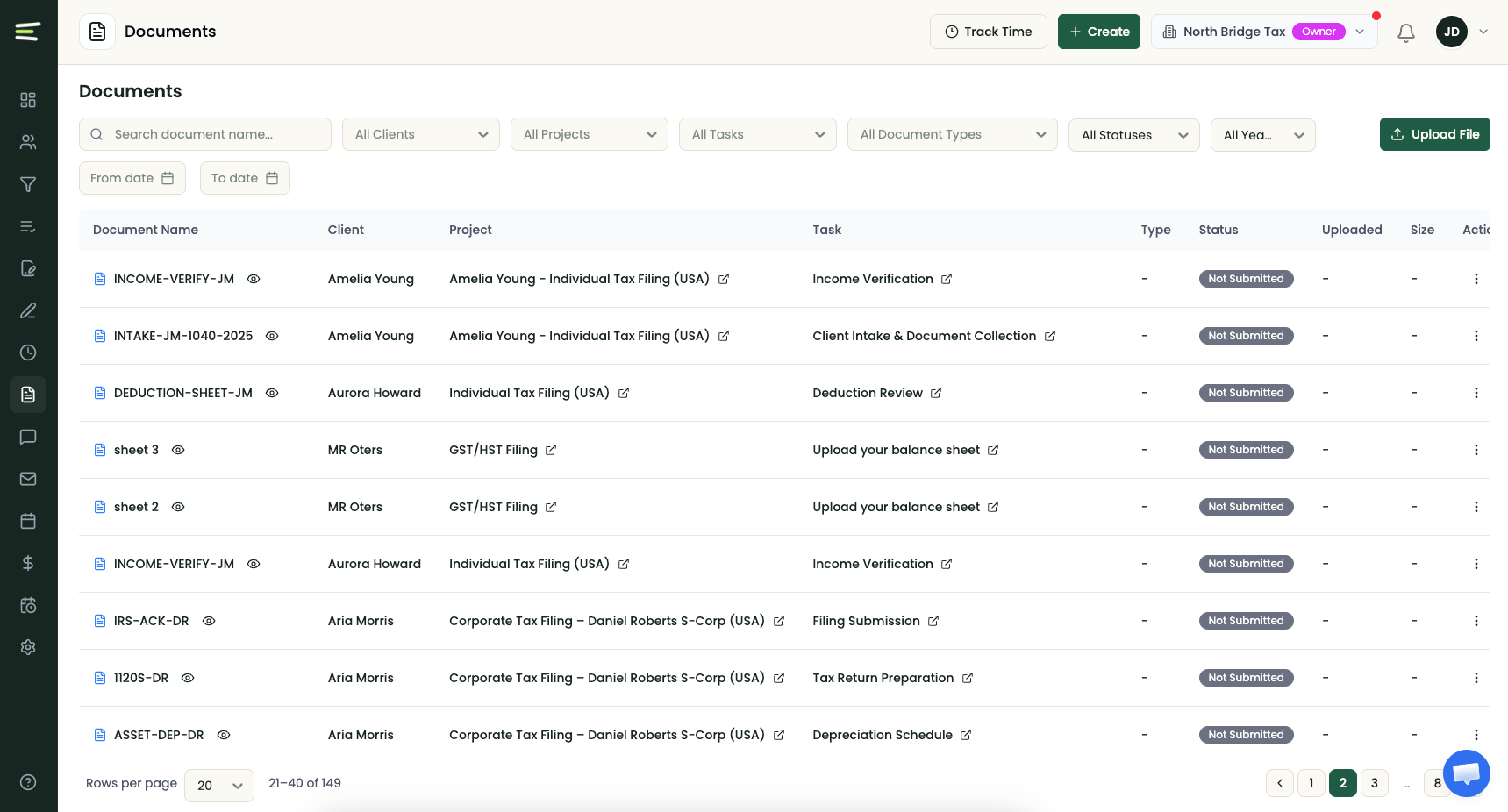
Time tracking and invoicing should be native so staff don't switch systems mid-workflow. Then confirm integration depth with the tools you already use, such as your bookkeeping software and tax preparation package. An integration that syncs one direction only, or that depends on manual CSV exports, is not a real connection, and the gap shows up the first time billing data and time entries don't reconcile.
A closer look at each platform
Karbon
Karbon offers email-integrated workflow and collaboration well suited to growing teams, with strong automation on its Business tier. Plans run $59 to $89 per user per month on annual billing, with features like automatic client reminders reserved for the higher tier and eSignature available as paid add-on credits. It's a capable platform, but it was built primarily for the U.S. and international market, so expect configuration work to match CRA filing cycles.
TaxDome
TaxDome provides an all-in-one model that appeals to tax-focused practices, bundling portal, documents, eSignature, and billing into one subscription. Pricing runs roughly $700 to $1,200 per seat per year depending on plan and commitment length, billed upfront, with the best rates requiring two- or three-year commitments. The upfront annual payment and multi-year structure is worth factoring into cash flow planning for a small firm.
Canopy
Canopy takes a modular approach: you license the pieces you need, starting at $74 per user per month and rising to $149 with additional paid add-ons on top. That flexibility suits firms that only want two or three modules, but a fully equipped seat can end up costing more than the all-in-one alternatives, so price out your actual feature list before comparing.
CCH iFirm
CCH iFirm targets larger, compliance-heavy CPA firms with deep tax functionality and modular pricing. It's a strong fit at the top end of the market, but the implementation weight and per-module structure are usually more than a small or mid-size practice needs.
Untangly
Untangly was designed around the workflows of Canadian accounting and tax firms from day one. T1 and T2 engagement workflows, CRA-aligned deadline tracking, document collection with a white-label client portal, and built-in eSignature are part of the core product rather than layered on through customization. It also includes engagement management, project templates and recurring projects, in-platform chat with clients and staff, email integration with Gmail and Outlook, and native time tracking and invoicing.
Pricing is flat rather than strictly per-user: $149 per month covers your first five seats, then $49 per additional seat, billed annually. Client accounts are free and unlimited, migration and support are included, and there's no setup fee or multi-year contract.
What to watch for with pricing across all vendors
Per-user pricing that looks reasonable for a three-person firm can jump steeply at five or ten users. Before you commit, confirm the billing currency, what your per-seat cost looks like at your current size and at double that size, whether client accounts count against your total, and whether the quote requires an upfront annual or multi-year payment. Look for pricing that fits the firm you are now and the firm you expect to be in two years.
Matching the platform to your firm
Solo and small practices
You need something affordable, fast to set up, and usable without a dedicated administrator. Avoid high per-user minimums and onboarding measured in months. The priorities at this size: a client portal, document request workflows, eSignature, and reliable deadline tracking. The goal is replacing email, spreadsheets, and a standalone billing tool with one system that runs itself.
Growing firms
At this size, team-wide visibility becomes the main reason to adopt a platform. You need staff assignments, engagement status across all open files, and shared deadline tracking so work moves without a manager coordinating everything manually. Client communication needs a paper trail the whole team can see, and billing should roll up from time tracking without month-end reconciliation by hand.
Established practices
Larger firms need deadline management across high client volume, document controls with clear audit trails, and reporting that shows pipeline and capacity at any point. Security posture, data handling clarity, and support responsiveness matter more at this scale. Ask whether the vendor's support team actually understands CRA filing requirements or whether those questions get routed to a generic help desk.
A practical checklist before you commit
Questions to ask in every demo
Go beyond the prepared feature tour:
- 01 Walk me through a T1 or T2 engagement from intake to filing.
- 02 How does the system handle CRA deadlines across a client base my size?
- 03 Where is client data stored, and what does your breach response process look like under PIPEDA?
- 04 What does my per-seat cost look like at my current team size and at double that, and is the payment monthly or upfront?
- 05 What does implementation look like for my client count and data format, and is migration support included or billed separately?
The answers tell you more than any feature checklist.
Plan the go-live realistically
Switching platforms mid-season is disruptive. Plan your go-live after a major filing peak, not during one. For most small Canadian firms, implementation takes four to eight weeks when data is reasonably clean and scope is limited to active clients and current engagements. A vendor that includes migration and gives you a dedicated onboarding contact is worth weighting more heavily than one that sends a help center link and a start date.
The right platform already understands how you work
Choosing practice management software comes down to a few clear filters: does it handle CRA deadlines natively, does it support your obligations under PIPEDA, and does it scale with your firm without straining the budget. Book a few demos with the checklist above and look for the platform that needs the least customization to feel like it was designed for your practice.
See a purpose-built Canadian platform in practice
Untangly works out of the box for T1 and T2 workflows. Migration and support are included, client accounts are free and unlimited, and there's no setup fee or long-term contract.
Book a free demoFrequently asked questions
What is accounting practice management software?
It's a platform that brings a firm's client records, engagements, filing deadlines, documents, client communication, time tracking, and billing into one system, replacing the mix of email, spreadsheets, and standalone tools most firms start with.
What should Canadian firms look for that U.S. firms don't need?
Native handling of CRA filing cycles (T1, T2, GST/HST), support for the firm's obligations under PIPEDA including breach response, and pricing and implementation scoped for the small and mid-size firms that make up most of the Canadian market.
How long does it take to implement practice management software?
For most small Canadian firms, four to eight weeks when data is reasonably clean and the scope is limited to active clients and current engagements. Plan your go-live after a filing peak, not during one.
How much does practice management software cost for a small firm?
Per-user platforms typically run $59 to $149 per user per month, often billed annually or upfront. Flat-base models like Untangly are $149 per month covering the first five seats, billed annually, which usually works out lower for firms under ten staff. Always price your firm at its current size and at double that size before committing.
Run your whole practice in one system.
See how Untangly handles T1 and T2 engagements, CRA deadlines, documents, and billing for a firm your size.
Book a demo